Big Bass Splash phone help: 6 practical tasks
A phone check is most useful when you give it a specific question. This guide follows six small tasks in the original Big Bass Splash practice game. It separates a page problem, a provider access message and a question about the controls. None of the tasks requires a casino deposit or predicts a result.
Return to the original practice room
1. Identify the client you reached
Start with the full title rather than the fish theme. The introduction and the board should identify Big Bass Splash. A similar name elsewhere in the Big Bass family does not establish that you are reading the same rules. Keep the introduction visible long enough to recognise the edition, then use the client’s own continue control when it is offered.
If you see a provider notice instead of the introduction, read it before doing anything else. That is an observation about this route in this context. It does not establish that a round has loaded, that the wrong edition appeared, or that another device will have the same access. A blank space and a clearly worded restriction are also different observations.
2. Read the practice balance
Locate the credit label and identify the currency shown beside it. The images used by this guide retain USD and a virtual balance from the original English demo. They are examples of that captured client, not a British cash account. A change to the practice credit is useful for understanding the display; those credits cannot be withdrawn.
Keep the credit amount separate from the total bet and any amount highlighted on the reels. Each belongs to a different part of the interface. If a message says that the client has restarted, check the displayed credit again rather than assuming continuity. Do not supply payment details to complete a reading exercise.
3. Inspect the stake setting
Find the total-bet label before a round. When a control changes the setting, verify the value that the client now shows. A plus sign or a minus sign can be too small to interpret from a reduced image alone. View the full-sized capture or the active interface, and make a single change so that its effect is clear.
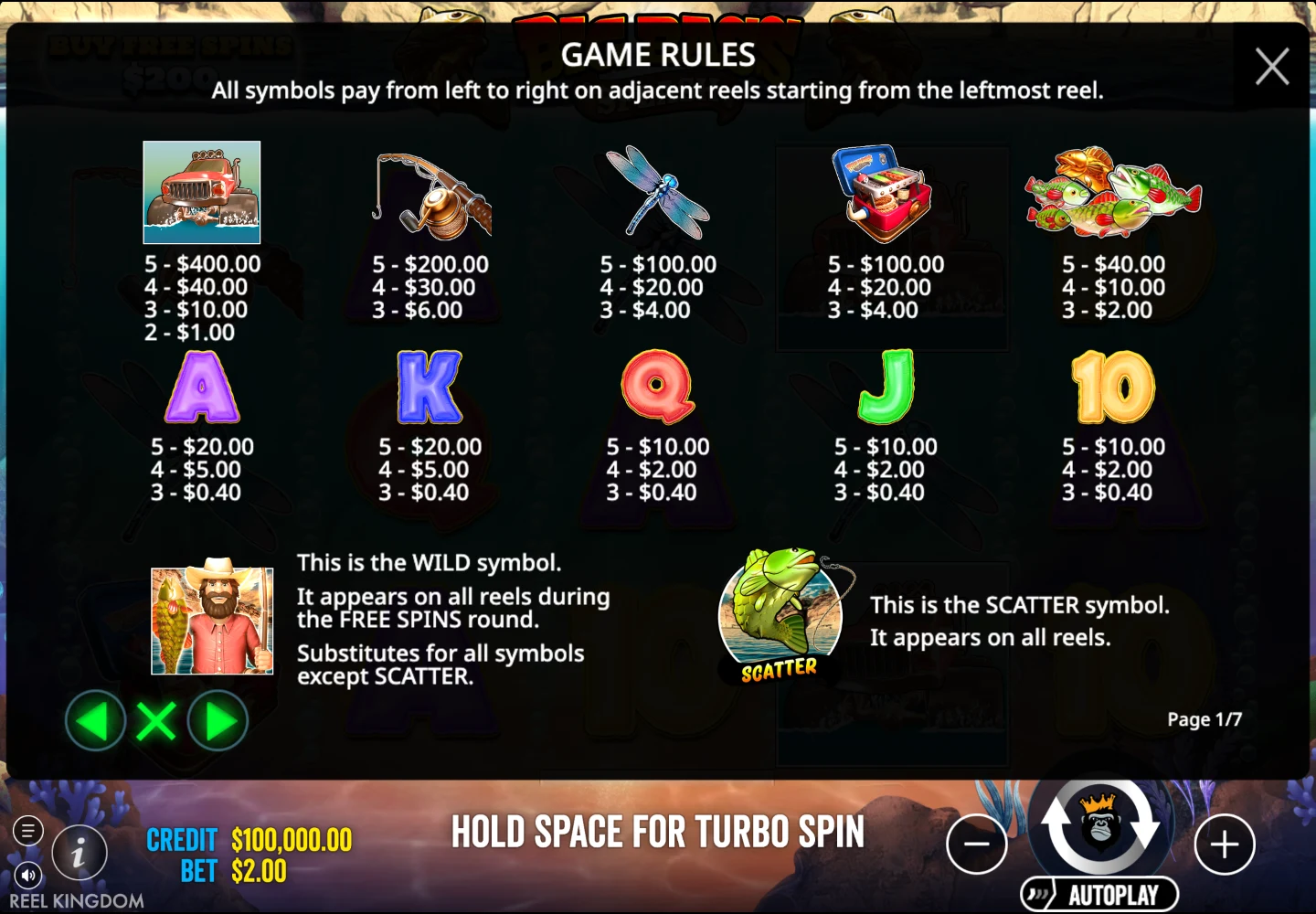
The amounts in the illustrated paytable belong to the captured stake. They should not be copied as universal payouts for every configuration. If you change a setting, reopen the current information page and read its context again. This guide leaves an unverified current bet range or RTP unset instead of borrowing it from another operator.
4. Open help and find its close control
Open the information control as a separate task. Before reading a dense page, find the close control and any next/previous arrows. The source capture’s first page identifies paying symbols, the fisherman wild and the scatter. The next pages explain money symbols, free spins and retriggers. Their page numbers are a route through information, not extra paylines.
Use the game’s current help for the configuration you are actually viewing. Our images explain the source version, while their captions retain the language and currency. The page’s image viewer can make the captured text larger; Close image or Escape returns to its original link. Closing an illustration and closing the live practice game are different controls.
5. Compare one task in both orientations
Choose a target such as the help close control, then repeat that exact task after rotation. A wider view may make a board larger while leaving less vertical room. Check the target’s visibility and the text around it instead of declaring one orientation universally better. The surrounding article can be readable even when a client’s controls are too compact.
Return to the original orientation and check whether the same client state remains. Some interfaces redraw; another message or a reload is a different observation. This guide does not claim a physical test of your handset, a British exit IP, or access across every browser. Record what you actually saw so that a layout question remains separate from an access question.
6. Finish and return to the guide
The guide’s Close demo control sits outside the provider frame. Use it to remove the embedded session and return focus to the button that opened it. If the client was opened through the separate provider link, close that external tab to return. Do not confuse the provider’s own information-panel close button with the guide’s session close button.
You can finish once the labels make sense. There is no need to wait for a feature, chase a favourable demonstration or move into money play. A helpful record of a problem contains the exact title, orientation and visible message, without passwords or account documents. For questions about an operator account or a payment, use that operator’s own support rather than a game-information guide.
Choose the next reading path
Use the six-check overview for a short reminder, the feature explanation for rules, or operator comparison criteria for a separate access decision. The official Big Bass Splash overview is the provider source; the loaded help remains the reference for the active client.